
| Attention Before you read this post, I highly recommend you check out my resources page for access to the tools and services I use to not only maintain my system but also fix all my computer errors, by clicking here! |
Are you having problems running a particular game or application? Are you attempting to update an app only for it to halt halfway through the process? If you’ve answered yes to any one of these questions, then you may be having an issue with the msvcp110.dll file. So what can you do about it? Continue reading to find out.
An msvcp110.dll is missing error indicates that an integral DLL or Dynamic Link Library file is inaccessible by the operating system. This particular DLL file is used by apps, computer games and important system programs, specifically those coded in Microsoft Visual C++. In the vast majority of cases, the error message will prevent it from running. Clicking on OK, in the error message will close the process.
DLL errors are amongst the most common errors you’re likely to face on your Windows based system. When it comes to the msvcp110.dll file, the exact error message will typically resemble something like the following:
The program can’t start because MSVCP110.dll is missing from your computer. Try reinstalling the program to fix this problem.
Fortunately, there are many ways you can fix this error, which we will cover in this tutorial. But before we get to those solutions, let’s take a closer look at its many common causes.
What Causes Msvcp110.dll Is Missing Errors?
Before you can effectively fix an error, you must have some understanding of what’s causing it. When it comes to the msvcp110.dll not found error, you’re looking at the following common causes:
- The app is outdated or incompatible: It could be conflicting with another app on your system, or it may simply be incompatible with your version of Windows. In some cases, a simple update may do the trick.
- A malicious file has infected your system: Malware is capable of infiltrating your system and injecting malicious code into integral Windows files (such as msvcp110.dll). A malware infection can manifest itself in a myriad of ways.
- Data corruption: Files on your system can get corrupted during a disk error, hardware failure, an interruption in the installation process or an abrupt Windows shutdown.
- Registry corruption: It’s possible the Windows registry is corrupted, thus, making it impossible for the operating system to locate the msvcp110.dll file.
- Software uninstallation: It’s not uncommon for the uninstallation of an app to result in the deletion of a shared DLL file. This is usually an unintentional side effect of bad coding.
Now that we have a general idea of the things that can cause an msvcp110.dll is missing error, let’s take a look at the various ways you can fix it.
How to Fix It
Depending on the cause of the msvcp110.dll error, you’re looking at different solutions to fix a similar problem. However, it can be quite difficult to pinpoint the exact cause of an error, which is why it’s recommended that you attempt all solutions outlined below.
Restore Msvcp110.dll
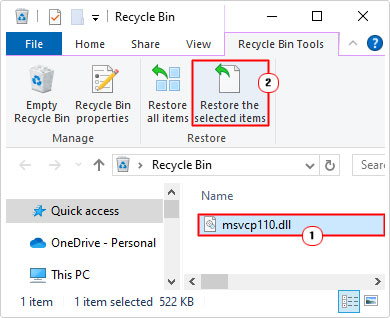
Probably the simplest and most likely cause of the msvcp110.dll error is that it was mistakenly deleted. If so, then you should be able to find it in the Recycle Bin and restore it.
Just do the following:
1. Boot into Windows as an Admin.
2. Then, double-click on Recycle Bin.

3. When the Recycle Bin loads up, click on the Msvcp110.dll file, and click on Restore the select items.
Reinstall Program
These DLL errors all have a similar generic error message that indicates an issue with the file and determines that reinstalling the problematic app may fix the problem. For that reason, I’d have to suggest you gave it a try.
It’s possible the culprit app comes with the msvcp110.dll file as part of the installation package. Thus, a full and complete installation may rectify the problem.
Even in circumstances when the error was caused by something else, a reinstallation of said app may still fix the problem.
So, go ahead and run through the installation process.
The most important aspect of the process is the uninstallation. You want to ensure all remnants of the app has been removed from the OS, before you begin the installation.
If you need help on how to do this, then check out my post on fixing uninstall problems.
Install Msvcp110.dll
If the msvcp110.dll was accidently erased from your system, then your only option will be to reinstall it. There are many ways to do this, but the simplest one is to download and install the Microsoft Visual C++ Redistributable Package.
You can find the package from the following Microsoft link here: https://www.microsoft.com/en-gb/download/details.aspx?id=48145
Use Windows Repair Tool to Fix Msvcp110.dll Is Missing Errors
If you’re looking for the simplest and most effective way of fixing the msvcp110.dll is missing error, then you cannot go wrong with this specific Windows repair tool.
The one I have in mind, is specifically designed for non-technical people, making a typically complex task a fairly simple one.
This tool is highly advanced, capable of rectifying a whole slew of problems on your system.
Errors, such as game, registry, DLL and Windows update errors can all be tackled by this tool. In addition, it can fix malware infections, file corruption and sluggish system performance.
This makes it you’re ideal maintenance and repair suite.
If, by any chance that interests you, then visit the link below:
CLICK HERE TO CHECK OUT THE ADVANCED REPAIR TOOL
 The solution(s) below are for ADVANCED level computer users. If you are a beginner to intermediate computer user, I highly recommend you use the automated tool(s) above! The solution(s) below are for ADVANCED level computer users. If you are a beginner to intermediate computer user, I highly recommend you use the automated tool(s) above! |
Download Msvcp110.dll
If all of the above solutions fail to fix the msvcp110.dll not found error, then you may want to try downloading and installing the file manually.
This can be done by following the steps below:
1. First, boot into Windows as an administrator.
2. Then download the appropriate msvcp110.dll version from the following links:
32-bit version: https://www.mediafire.com/file/wg7cglwawgdjjun/msvcp110+32.zip/file
64-bit version: https://www.mediafire.com/file/eqsx1c6mikswr8s/msvcp110+64.zip/file
Note: If you don’t know whether you have a 32-bit or 64-bit operating system, my post on fixing OpenCL.dll errors will show you how to find out.
3. Next, double-click on the msvcp110.zip file to open it, then click on Extract To.
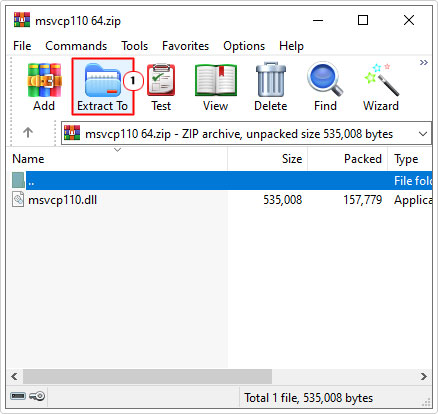
Note: For this tutorial, I am using WinRAR.
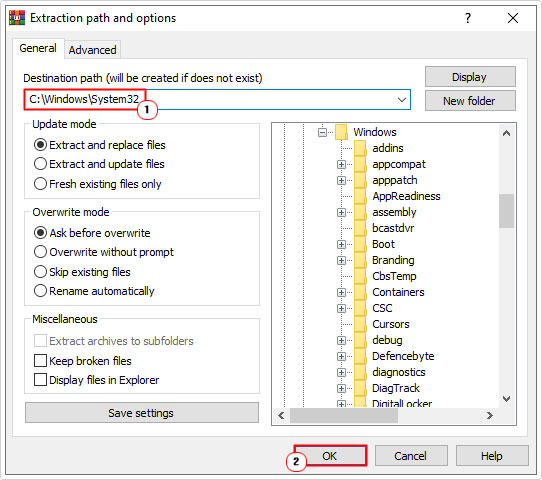
4. This will bring up the Extraction path and options applet, from here, type C:\Windows\System32 into the Destination path (for 32-bit systems) or C:\Windows\SysWOW64 into the Destination path (for 64-bit systems) and click on OK.
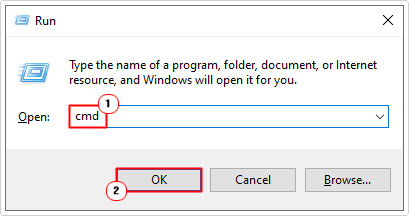
5. Once that’s done, press  + R, type cmd and press CTRL + Shift + Enter.
6. This will bring up Command Prompt, from here, type the command below and press Enter.
regsvr32 MSVCP110.dll
7. Lastly, close Command Prompt and restart your system.
Use SFC
SFC stands for System File Checker, and it is a built-in Windows tool, designed to scan, detect and replace missing and/or corrupt system files. This tool may come in handy when the cause of the error is due to system corruption, and not necessarily the corruption of the identified file.
Anyway, for instructions on how to access and use this tool, check out my post on how to run SFC Scannow.
Use Windows System Restore
If the msvcp110.dll is missing error occurred fairly recently, then you may be able to use the Windows System Restore feature to set the system back to the point, before the error reared its ugly head. One thing to keep in mind is that this tool does have its limitations. It cannot restore previously erased files. So if the error is due to file erasure, then a restore will not fix it. However, if it’s due to configuration changes, or a program install, then this is your go-to solution.
You can find instructions on how to use this tool from my post on what is a restore point.
Are you looking for a way to repair all the errors on your computer?

If the answer is Yes, then I highly recommend you check out Fortect.
Which is the leading registry cleaner program online that is able to cure your system from a number of different ailments such as Windows Installer Errors, Runtime Errors, Malicious Software, Spyware, System Freezing, Active Malware, Blue Screen of Death Errors, Rundll Errors, Slow Erratic Computer Performance, ActiveX Errors and much more. Click here to check it out NOW!