
| Attention Before you read this post, I highly recommend you check out my resources page for access to the tools and services I use to not only maintain my system but also fix all my computer errors, by clicking here! |
Have you recently encountered an MSVCR71.dll missing error while using your Windows based system? Errors such as this will usually halt or prevent a program from running. When attempting to open a specific application the end user may be greeted with the following error message: “The code execution cannot proceed because MSVCR71.dll was not found.” So, what exactly causes this error? Such errors may be the result of data corruption or accidently erasure of the specified file. Continue reading to learn more.
DLL or Dynamic Link Library files are essential to your Windows based system, as they are a file type specifically created for the purpose of more efficient memory use, and the reduction of disc space usage. This is done by making the files reusable across multiple applications. This means, many applications on your system may require the same file in order to run.
If any number of these DLL files gets corrupted or goes missing, the program that requires it may stop working.
MSVCR71.dll is a file that’s required by a number of apps you may have installed on your system. Thus, if something were to happen to it, you may find that certain programs you rely on, will no longer start. This is an error that occurs most frequently on the latest iterations of Windows, such as Windows 10 & 11. In this tutorial, we’ll be going through a number of proven ways of fixing the MSVCR71.dll missing error. But, before we get to the solutions, let’s take a more in-depth look at its potential causes.
What Causes MSVCR71.dll Missing Errors?
Ultimately, there are three most common reasons the OS may not be able to find the MSVCR71.dll file. That is, because the file has been corrupted, the file has been deleted or the Windows registry has been corrupted.
However, there are numerous reasons why such circumstances may occur in your system. They are, the following:
- Malware: It’s possible a malicious file (Virus, Trojan Horse etc…) has infiltrated your system and deleted or corrupted important system files, this may include the MSVCR71.dll file.
- Internet Security Software: Some security tools can be overzealous in their desire to protect your system. This means, it may have flagged or quarantined certain files it deemed a potential threat to your system. This happens most commonly during the installation or update of an app.
- Uninstalling an App: It’s possible the removal or uninstallation of an app, resulted in the erasure of the MSVCR71.dll file. This can happen when a program has been poorly coded.
- Data Corruption: DLL files can become corrupted due to a multitude of reasons. Such as a sudden power surge, disk drive errors, or an incomplete software installation.
- Corrupt Installation: During the installation phase of an app, certain files may not copy over or could get corrupted. This oftentimes happens when your system runs low on resources or if it’s interrupted during the process.
Now that you have a general idea of what causes MSVCR71.dll missing errors, we will move on to the most effective ways of fixing this error.
How to Fix It
MSVCR71.dll belongs to the Visual C++ runtime files required by Windows. These files contain functions that some applications on your system require to run. Primarily those coded in Visual C++. If these files are inaccessible, then the app does not run.
There are several solutions available to you, all of which have helped others in your position dealing with an MSVCR71.dll missing problem. You shouldn’t have to try all of them, however, without knowing exactly what’s causing the problem, you may need to go through most, if not all of them.
So, let us begin…
Download Visual C++ Redistributable Package
As previously touched on, the MSVCR71.dll file belongs to the Visual C++ Redistributable package of files. This means, you should be able to reinstall the file simply by downloading and installing the redistributable package.
It’s a fairly simple process, just visit the following Microsoft link: https://www.microsoft.com/en-gb/download/details.aspx?id=48145
On the Visual C++ Redistributable for Visual Studio page, select your Language (from the dropdown menu), then click on Download.
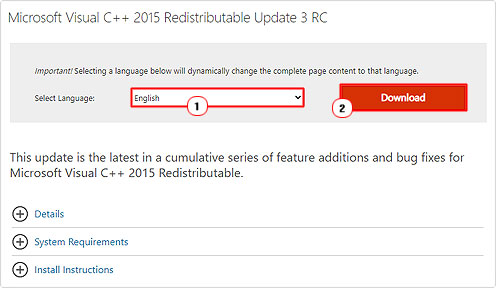
Download the setup file to your Desktop by selecting vc_redist.x64.exe or vc_redist.x86.exe and clicking on Download.

Note: vc_redist.x64.exe is for 64-bit operating systems andvc_redist.x86.exe is for 32-bit operating systems.
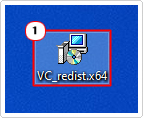
Then double-click on it to begin the installation process.
Use Windows Repair Tool to Fix MSVCR71.dll Missing Error
Before trying any of the more complicated solutions below (in fixing the MSVCR71.dll error), you may want to try a Windows repair tool to fix the problem.
The tool I have in mind is a highly advanced, multifaceted tool, capable of fixing a plethora of issues and errors on your system. From app, BSOD, DLL, game and much more. It’s also capable of detecting and removing malicious (virus) threats.
In addition to its repair capabilities, it will also optimise your systems performance, ensuring it operates much faster. All you need to do, is download, install and run it, and it’ll do the rest.
If by any chance, this interests you, then visit the link below:
CLICK HERE TO CHECK OUT THE ADVANCED REPAIR TOOL
Run a Virus Scan
The MSVCR71.dll missing error may be the result of a malicious file on your system. It’s not uncommon for a DLL file to be corrupted by a virus. So that’s something you don’t want to rule out.
Thus, as a next solution, you may want to consider running a full scan of your system using your antivirus software. You’ll want to run a Deep Scan, then verify whether or not it fixed the error after.
However, if you don’t have an antivirus tool, or you’d simply like to try something better, then I’d recommend you give System Mechanic a try.
It is a highly advanced antimalware tool, capable of removing a plethora of virus types from your system within a single scan.
If that interests you, then please visit the link below:
CLICK HERE TO CHECK OUT SYSTEM MECHANIC
 The solution(s) below are for ADVANCED level computer users. If you are a beginner to intermediate computer user, I highly recommend you use the automated tool(s) above! The solution(s) below are for ADVANCED level computer users. If you are a beginner to intermediate computer user, I highly recommend you use the automated tool(s) above! |
Reinstall Affected App
This probably goes without saying, as the error could be the result of an incomplete or corrupted installation.
Simply, uninstall the app, then install it again.
Uninstallation is simple, just do the following:
1. Boot into Windows as an admin.
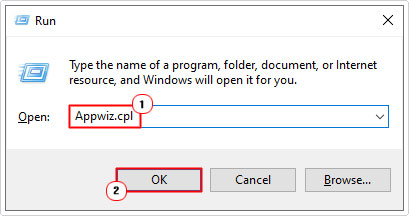
2. Then press  + R, type Appwiz.cpl and click on OK.
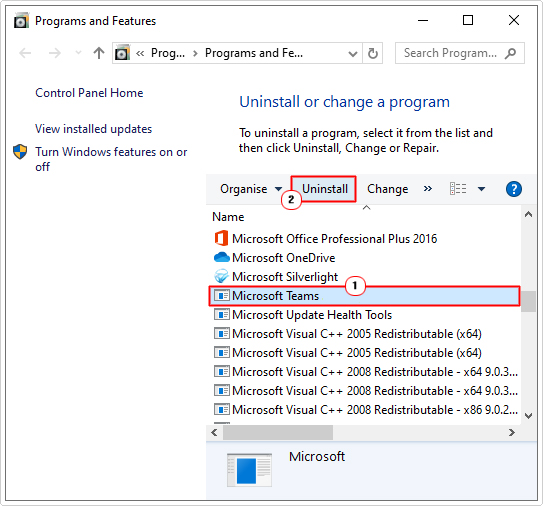
3. This will bring up Programs and Features, simply click on the app, then click on Uninstall.
4. Follow the onscreen instructions to remove the app. Then begin the Installation process again; once it’s complete.
Install MSVCR71.dll
If the above solutions fail to fix the MSVCR71.dll missing error, then you may want to try manually downloading and installing the MSVCR71.dll file to your system.
To do that, follow the steps below:
1. First, boot into Windows as an admin.
2. Then download the MSVCR71.zip file from the following link: https://www.mediafire.com/file/6z57gr2x93ah2n4/msvcr71.zip/file
3. Double-click on the MSVCR71.zip file to open it, then click on Extract To.
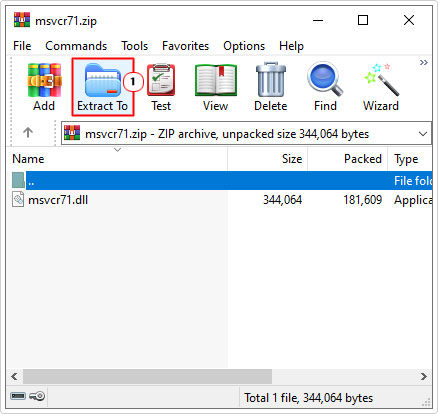
Note: For this tutorial I’m using WinRAR.
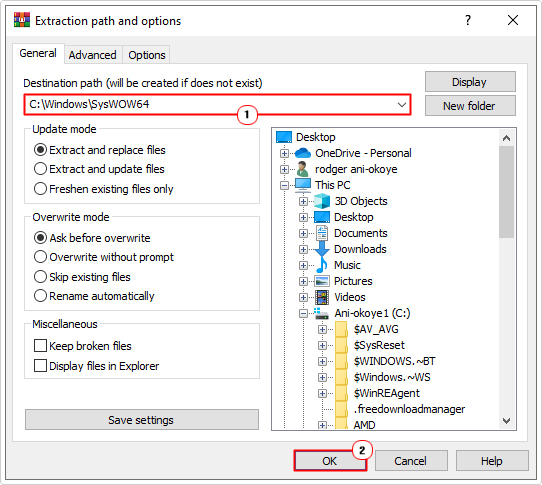
4. This will bring up the Extraction path and options applet. Type C:\Windows\SysWOW64 into the Destination path box, then click on OK.
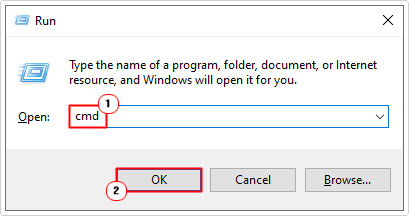
5. Close WinRAR, then press + R, type cmd and press CTRL + Shift + Enter.
6. When Command Prompt loads up, type the command below and press Enter.
regsvr32 msvcr71.dll
7. Lastly, restart your system, then verify whether or not it fixed the error.
Use SFC & DISM
The corruption of key Windows files can lead to a plethora of problems to your system. DLLs being one of many error types you might face. This is where the built-in repair tools, SFC (System File Checker) and DISM (Deployment Image Servicing and Management) come into the picture.
To begin, we will start with SFC. Just do the following:
1. First, follow step 5 of Install MSVCR71.dll.
2. When Command Prompt loads up, type the command below and press Enter.
SFC /Scannow
3. Once the scan has complete, type the DISM command below and press Enter.
DISM /Online /Cleanup-Image /Restorehealth
4. Lastly, close Command Prompt and restart your computer.
Reset Windows to Fix MSVCR71.dll Missing Error
If the MSVCR71.dll missing error continues to persist, even after attempting all the solutions above, you may want to try something a little more holistic, like an OS reset.
If the error is the result of a third-party tool or app, then this reset should do the trick.
The whole process is fairly simple. For step-by-step instructions on how to carry out a PC reset, check out my post on fixing FAULTY HARDWARE CORRUPTED PAGE.
Are you looking for a way to repair all the errors on your computer?

If the answer is Yes, then I highly recommend you check out our 24/7 Live Support Service.
Which is the leading Online Support Service that is able to help you cure your system from a number of different ailments such as Windows Installer Errors, Runtime Errors, Malicious Software, Spyware, System Freezing, Active Malware, Blue Screen of Death Errors, Rundll Errors, Slow Erratic Computer Performance, ActiveX Errors and much more. Click here to check it out NOW!