
| Attention Before you read this post, I highly recommend you check out my resources page for access to the tools and services I use to not only maintain my system but also fix all my computer errors, by clicking here! |
Errors related to the MSVCR120.dll file may occur when attempting to launch specific apps and games within Windows. So what do you do? Well, there are an assortment of options available to you, all of which I hope to explain in this tutorial. So if you’re currently battling an MSVCR120.dll missing error (which is most likely), continue reading for a rundown of how to tackle it.
MSVCR120.dll is a file that can be located in one of the following locations:
C:\Windows\System32
C:\Windows\SysWOW64
Depending on your OS architecture, you’ll find it in the System32 folder for 32-bit Windows and SysWOW64 for 64-bit systems.
MSVCR120.dll belongs to the Microsoft Visual C++ Runtime Library of files. This makes it a crucial Windows library file that is required by applications and games that were programmed (developed) in Visual C++. A DLL file is made up of a series of instructions for the app to use and access the different Windows services.
These services are naturally, integral to the functionality of the app, which is why Windows will refuse to run the app when this file is missing.
That said, a corrupted or incompatible MSVCR120.dll file is also capable of causing the same problem, especially when trying to run certain games.
For those of you wondering what you can do to fix this problem, I’m here to say…quite a lot. This is a fairly common problem, so the list of verifiable solutions has built up over the years.
However, before we get to the solutions, let’s do our customary look at the various known causes of this error.
What Causes MSVCR120.dll Is Missing Errors?
DLL files are an integral component of your Windows operating system, for this reason, they should never be erased or altered in any way, as this can and oftentimes does, generate DLL-related errors. However, some of the more common reasons why MSVCR120.dll (specifically) errors may occur, include:
- The Windows registry has been corrupted.
- MSVCR120.dll was accidently erased or moved.
- A malicious file infiltrated the system and corrupted MSVCR120.dll.
These are solely the most likely reasons, as there may be others.
Now, with that out of the way, let’s take a look at the numerous ways you can fix it.
How to Fix It
So your system throws up an MSVCR120.dll is missing error, every time you attempt to start an app or run a video game?
Does it resemble anything like the following?
The program can’t start because MSVCR120.dll is missing from your computer. Try reinstalling the program to fix this problem.
If so, then you needn’t panic…why? Because this is a common problem that can be solved fairly easy, depending on the severity of the problem.
Anyway, below are a list of solutions, I suggest you utilise them in the order that they appear, as they have been arranged for effectiveness and ease.
Use Windows Repair Tool to Fix MSVCR120.dll Is Missing Errors
Before utilising any of the more, complex solutions, it’s always best to start with the simplest. This brings us to the Windows repair tool.
Such tools are specifically designed to tackle a wide assortment of errors (including MSVCR120.dll missing errors). The tool I have in mind was designed by experienced professionals in the field and is proven to fix game errors, Windows update errors, registry corruption, DLL errors, BSOD errors and much more.
If, by any chance this interests you, then I suggest you visit the link below:
CLICK HERE TO CHECK OUT THE ADVANCED REPAIR TOOL
 The solution(s) below are for ADVANCED level computer users. If you are a beginner to intermediate computer user, I highly recommend you use the automated tool(s) above! The solution(s) below are for ADVANCED level computer users. If you are a beginner to intermediate computer user, I highly recommend you use the automated tool(s) above! |
Reinstall Microsoft Visual C++ Redistributable Package
Because the MSVCR120.dll file is a component of Microsoft Visual C++, this means, you should be able to reinstall the file, by downloading and reinstalling the redistributable.
That said, you have several options, you can download it or attempt a repair. I’d suggest the repair first, then the download second.
The instructions are as follows:
1. First, boot into your system as a full administrator.
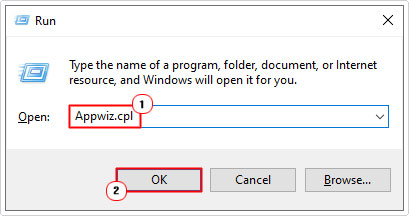
2. Next, Press  + R, type Appwiz.cpl and click on OK.
3. When Uninstall or change a program loads up, scroll down and click on Microsoft Visual C++ 2015-2022 Redistributable (x64) then click on Change.
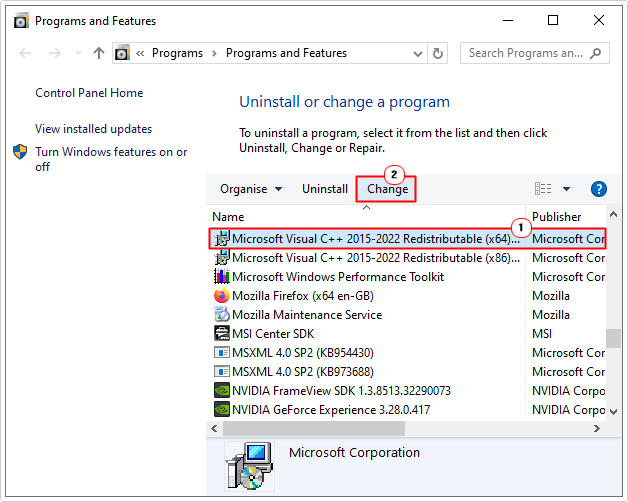
Note: If you’re on a 32-bit operating system, then click on the (x86) version.
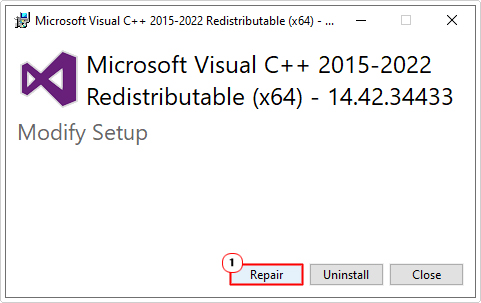
4. This will bring up the Microsoft Visual C++ 2015-2022 Redistributable (x64) applet, click on Repair to begin the process.
If that fails to fix the MSVCR120.dll error, then you can re-download the package from the following Microsoft link: https://learn.microsoft.com/en-us/cpp/windows/latest-supported-vc-redist?view=msvc-170
Note: Download the latest supported version for your OS. X86 = 32-bit, X64 = 64-bit.
Run a Virus Scan
There are a litany of computer viruses out there, many of which are highly capable of infiltrating and corrupted key Windows files, like MSVCR120.dll.
To properly tackle this threat, users must scan their system using an antivirus scanner.
Do you have an antivirus scanner on your system? If not, then you can run a full scan using the built-in Windows Defender.
The instructions are as follows:
1. Boot into Windows as an administrator.
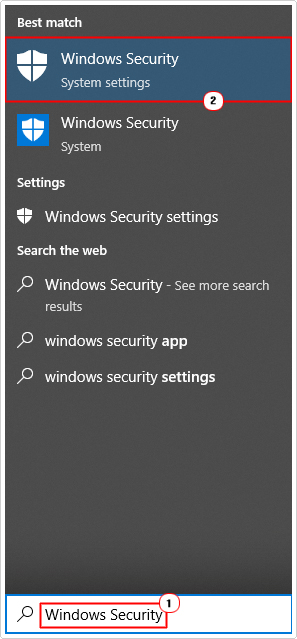
2. Next, press + S, type Windows Security and click on Windows Security.
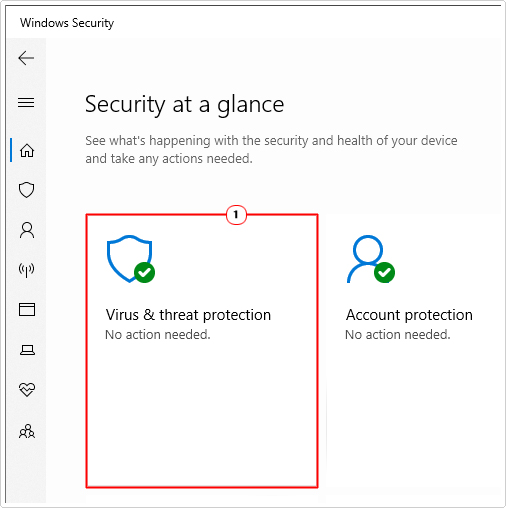
3. When Windows Security loads up, click on Virus & threat protection.
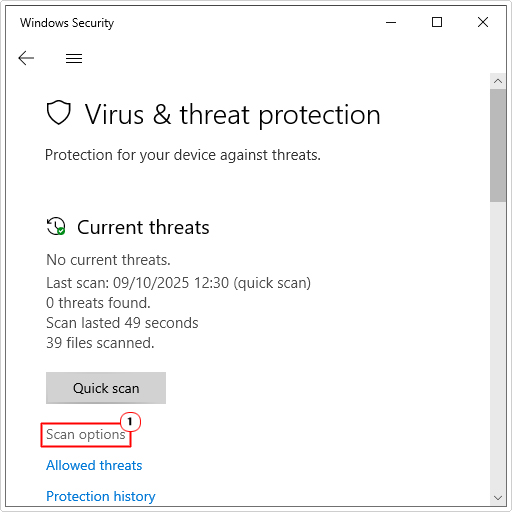
4. When the Virus & threat protection page loads up, click on Scan options.
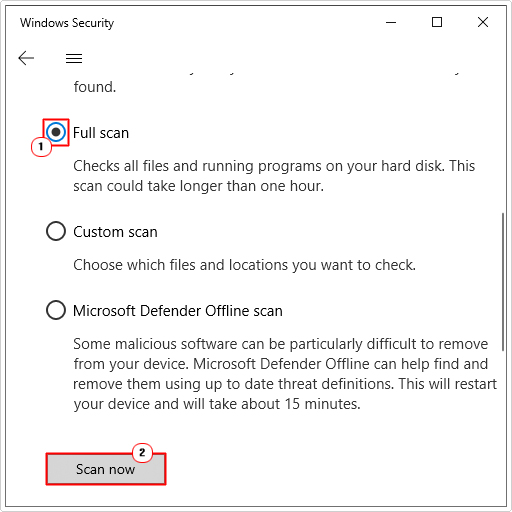
5. Lastly, click on Full scan, then click on Scan now.
As a viable alternative, if the built-in scanner fails to identify and/or fix the MSVCR120.dll missing error, you may want to consider using SpyHunter. Which is one of the very best antimalware tools in the online marketspace.
For more information on SpyHunter, visit the link below:
CLICK HERE TO CHECK OUT SPYHUNTER
Reinstall MSVCR120.dll
If the redistributable package was unable to replace or reinstall the MSVCR120.dll file, then you may be forced to do it manually (if none of the proceeding solutions fixed the error).
The instructions are as follows:
1. First, boot into Windows as an admin.
2. Now, download the latest version of MSVCR120.dll for your OS (from the following links):
32-bit: https://www.mediafire.com/file/2bnle0wf8kff4sx/msvcr120+32.zip/file
64-bit: https://www.mediafire.com/file/uc4rylti5t2xbt1/msvcr120+64.zip/file
3. Next, open the msvcr120.zip file, then click on Extract To.
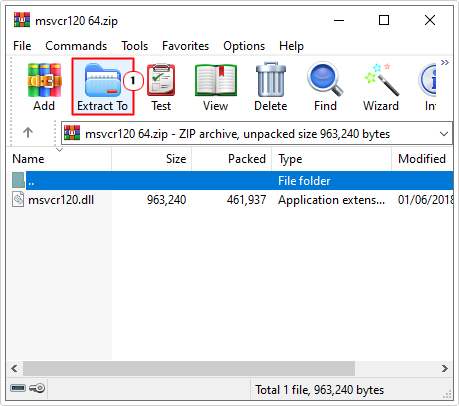
Note: For this tutorial we are using WinRAR.
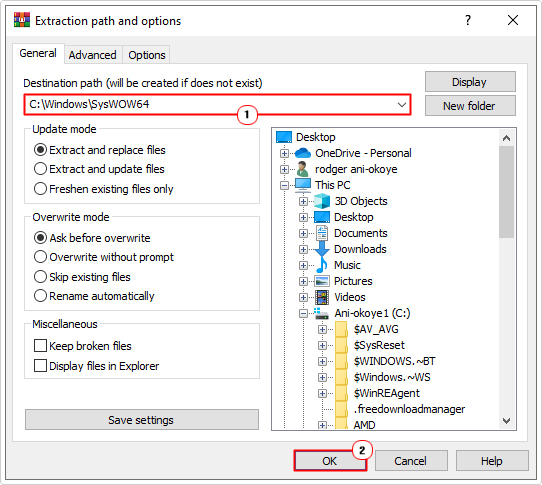
4. This will bring up the Extraction path and options applet, from here, type C:\Windows\System32 (for 32-bit systems) or C:\Windows\SysWOW64 (for 64-bit systems) into the Destination path and click on OK:
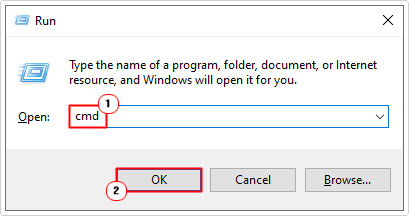
5. Once that’s complete, press + R, type cmd and press CTRL + Shift + Enter.
6. When Command Prompt loads up, type the following command below and press Enter.
regsvr32 MSVCR120.dll
7. Close Command Prompt then restart your system.
Run SFC & DISM
MSVCR120.dll is missing errors can occur due to corruption. In instances like this, you’ll want to replace the file. There are several verifiable ways you can do this, with the SFC and DISM tools being amongst them.
These tools can be quite limiting, which is why it’s mentioned here. However, if all else has failed up to this point, then it won’t hurt to try.
For step-by-step instructions on how to use these tools, I suggest you check out my post on fixing Msinfo32.exe “Can’t Collect Information” errors.
Are you looking for a way to repair all the errors on your computer?

If the answer is Yes, then I highly recommend you check out Advanced System Repair Pro.
Which is the leading registry cleaner program online that is able to cure your system from a number of different ailments such as Windows Installer Errors, Runtime Errors, Malicious Software, Spyware, System Freezing, Active Malware, Blue Screen of Death Errors, Rundll Errors, Slow Erratic Computer Performance, ActiveX Errors and much more. Click here to check it out NOW!